Fakturuj.si Logo Fakturuj.si
  • Home
  • Features
  • For whom
    • Self-employed persons
    • Small businesses & Ltd.
    • Accountants
    • E-shops

    • All industries (32)
  • Integrations
  • Price list
  • About us
  • Support
  • 🇨🇿 Čeština
  • 🇸🇰 Slovenčina
  • 🇬🇧 English
  • 🇩🇪 Deutsch
  • 🇭🇺 Magyar
  • 🇺🇦 Українська
🇨🇿 🇸🇰 🇬🇧 🇩🇪 🇭🇺 🇺🇦
Login Register
Fakturuj.si
  • Features
  • Price list
  • Calculators
    • All calculators

    • 🇸🇰 Slovakia
    • Tax calculators SK
    • 🇨🇿 Czech Republic
    • Tax calculators CZ
    • 🇭🇺 Hungary
    • Tax calculators HU
  • Prihlásiť sa
  • Registrovať sa
Fakturuj.si Logo Fakturuj.si
  • Home
  • Features
  • For whom
    • Self-employed persons
    • Small businesses & Ltd.
    • Accountants
    • E-shops

    • All industries (32)
  • Integrations
  • Price list
  • About us
  • Support
  • 🇨🇿 Čeština
  • 🇸🇰 Slovenčina
  • 🇬🇧 English
  • 🇩🇪 Deutsch
  • 🇭🇺 Magyar
  • 🇺🇦 Українська
🇨🇿 🇸🇰 🇬🇧 🇩🇪 🇭🇺 🇺🇦
Login Register
  1. Home
  2. Tutorials
  3. How to add and manage clients
Clients

How to add and manage clients

Čas: 1 minute Pre: new users who are building their client database

Create your client database in seconds. Simply enter the ID number or name of the client and Fakturuj.si will automatically fill in the rest of the data from the registry.

Contents

All guides

Getting started
  • How to import data from another billing system
  • How to issue your first invoice in Fakturuj.si
Documents
  • Price list of services vs. Warehouse - when to use what
  • How to export invoices for an accountant
  • How to issue a quotation
  • How to issue a credit note (cancellation invoice)
  • How to issue an advance invoice
  • How to send an invoice by email to a client
  • How to issue an invoice in a foreign currency
  • How to issue a recurring (regular) invoice
Clients
  • How to add and manage clients
    Payments
    • How to automatically match payments with invoices
    • How to mark an invoice as paid
    Expenses
    • How to record costs (expenses)
    Settings
    • How to set the appearance of the invoice (logo, colours, template, QR code)
    • How to set up invoice numbering
    The screenshots in this guide show the app interface in Slovak. The app is available in your language with the same layout.

    Clients are at the heart of your invoicing. In this guide, we’ll show you how to easily add a new client — for Slovak and Czech clients, simply enter the company registration number (IČO) or company name, and Fakturuj.si will automatically fill in the rest of the details.

    1. Open the Clients section

    In the left-hand menu, click on Clients.
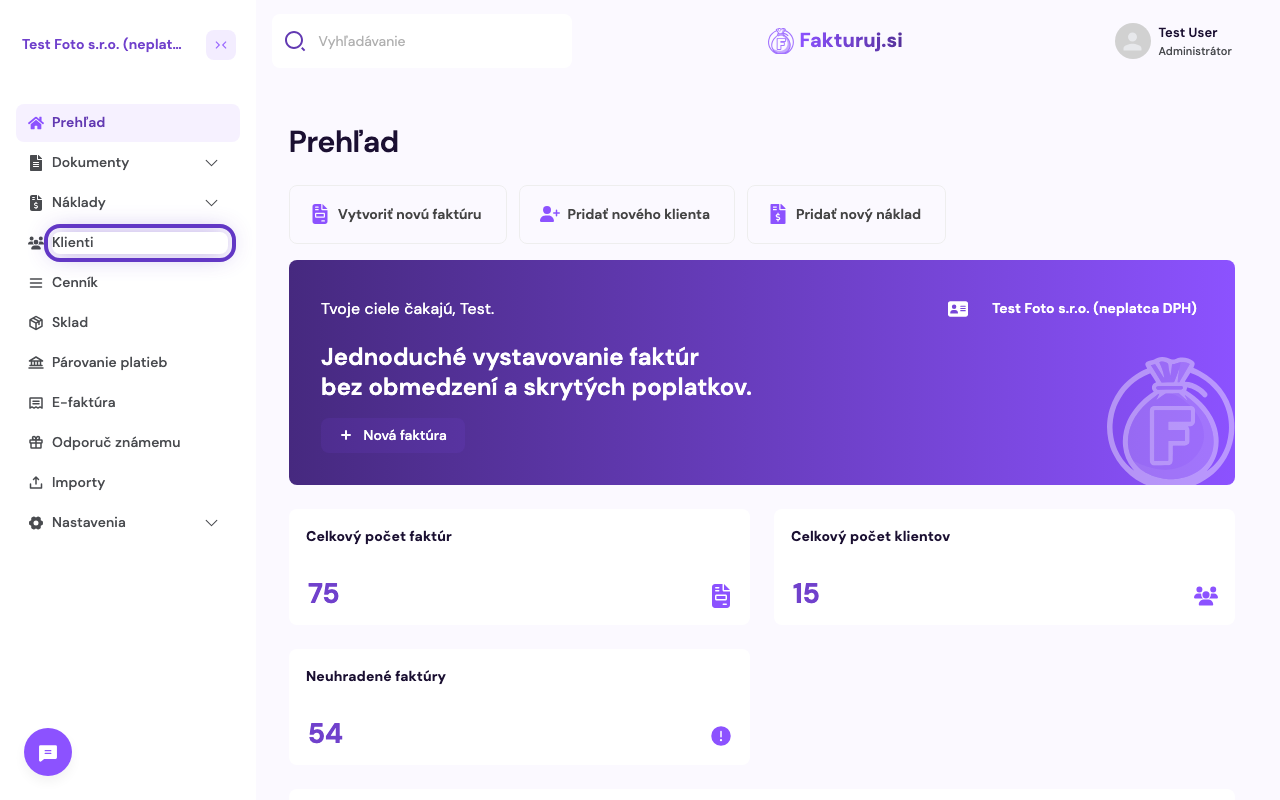
    Položka Klienti v ľavom menu

    2. List of your clients

    The Clients page will open, where you will see all existing clients with their company registration number and status (active / inactive). You can search for clients by name or filter them.
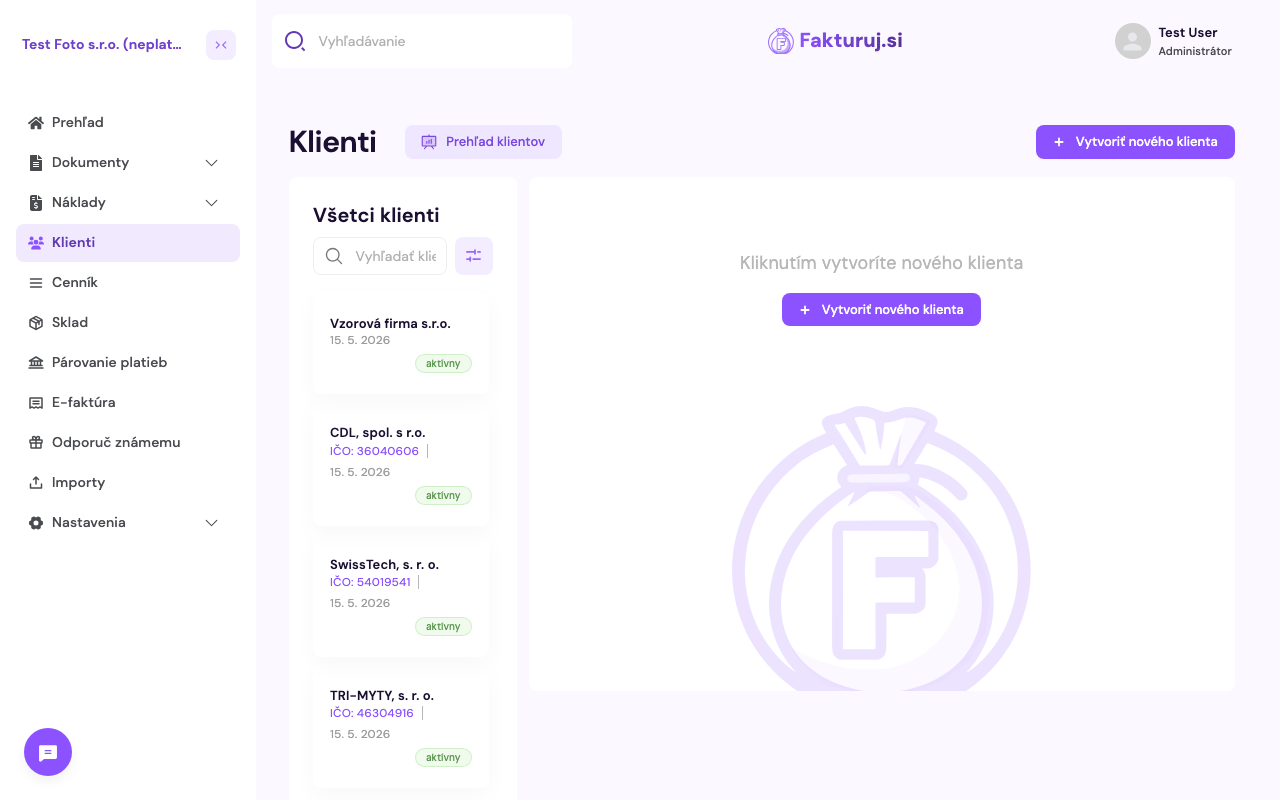
    Zoznam klientov

    3. Create a new client

    In the top right-hand corner, click on the purple ‘+ Create new client’ button.
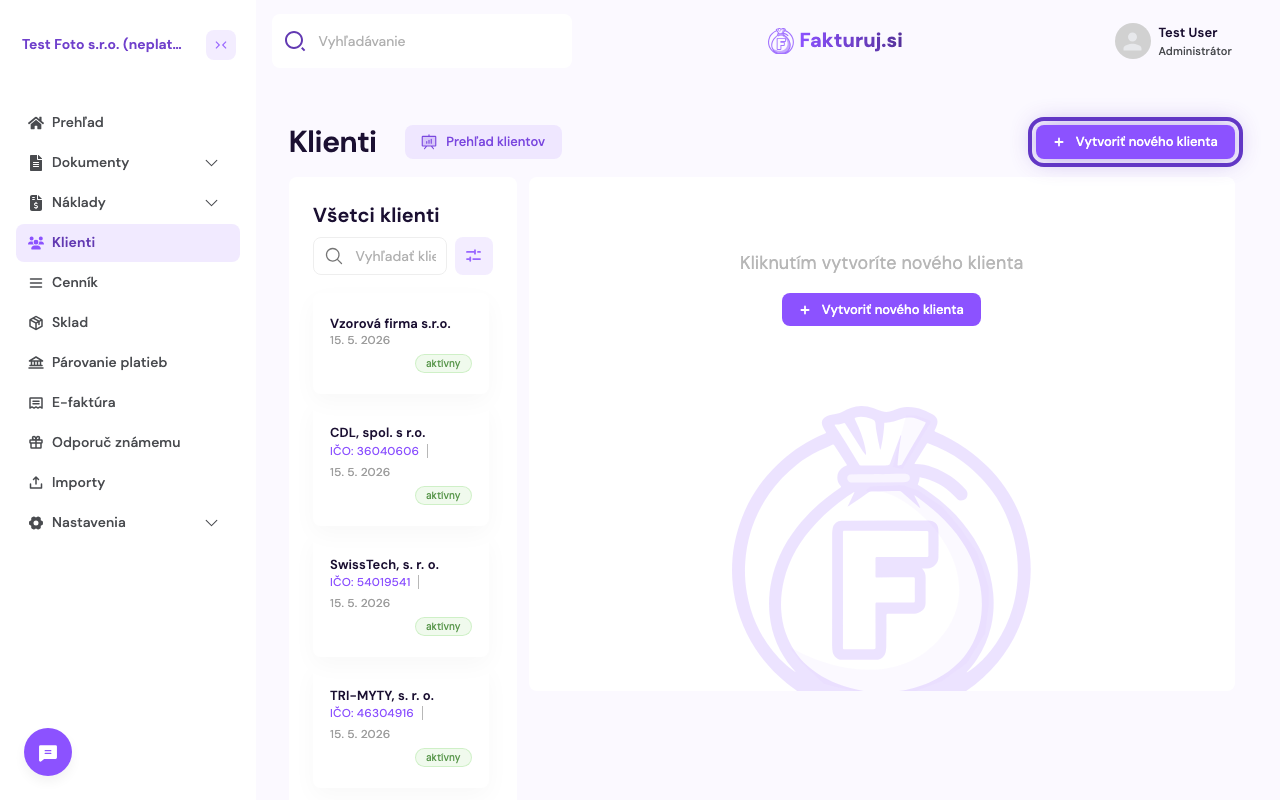
    Tlačidlo Vytvoriť nového klienta

    4. Fill in the details

    The “New Client” form will open with two tabs — Basic Information (contact details, company registration number, address) and Invoice Settings (default due dates, language, etc.).
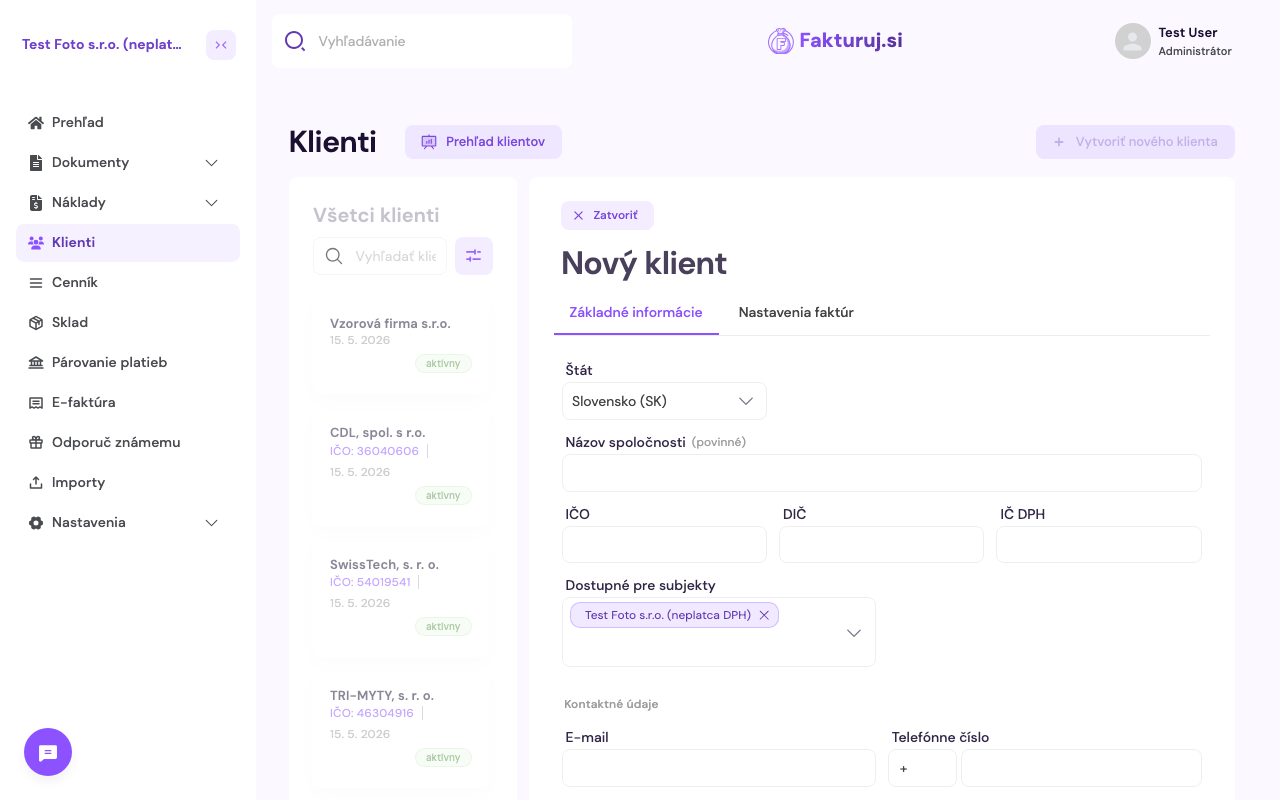
    Prázdny formulár nového klienta

    Only the Company name is mandatory. For Slovak clients, we recommend also filling in the Company ID, Tax ID and (if a VAT payer) VAT ID.

    • Country — defaults to the application language (SK or CZ). For Slovakia and the Czech Republic, data is automatically completed based on the company name or company registration number — the register is searched automatically as soon as you start typing.
    • Company name (required)
    • Company registration number / Tax ID / VAT number
    • Email + phone number — for sending invoices and communication
    • Address — street, town, postcode
    • IBAN / SWIFT — if you also want to record the client’s bank details
    • Note — internal information, will not appear on the invoice
    Tip: simply start typing the Company Registration Number or company name — Fakturuj.si will automatically search for the details in the register (ORSR for SK, ARES for CZ) and fill in the other fields.

    5. Invoice settings (optional)

    In the second tab, Invoice settings, you can set individual preferences for this client, which will be applied to every invoice issued to them — for example:

    • Default payment term — the number of days you want to give the client to pay (e.g. 7, 14, 30)
    • Default note — text that is automatically added to invoices for this client

    These fields are optional — if you do not fill them in, the entity’s global settings will be used.

    6. Save the client

    Once you have filled in the details, click on “Create client” at the bottom left. The client will be added to the list and you can select them immediately when creating a new invoice.
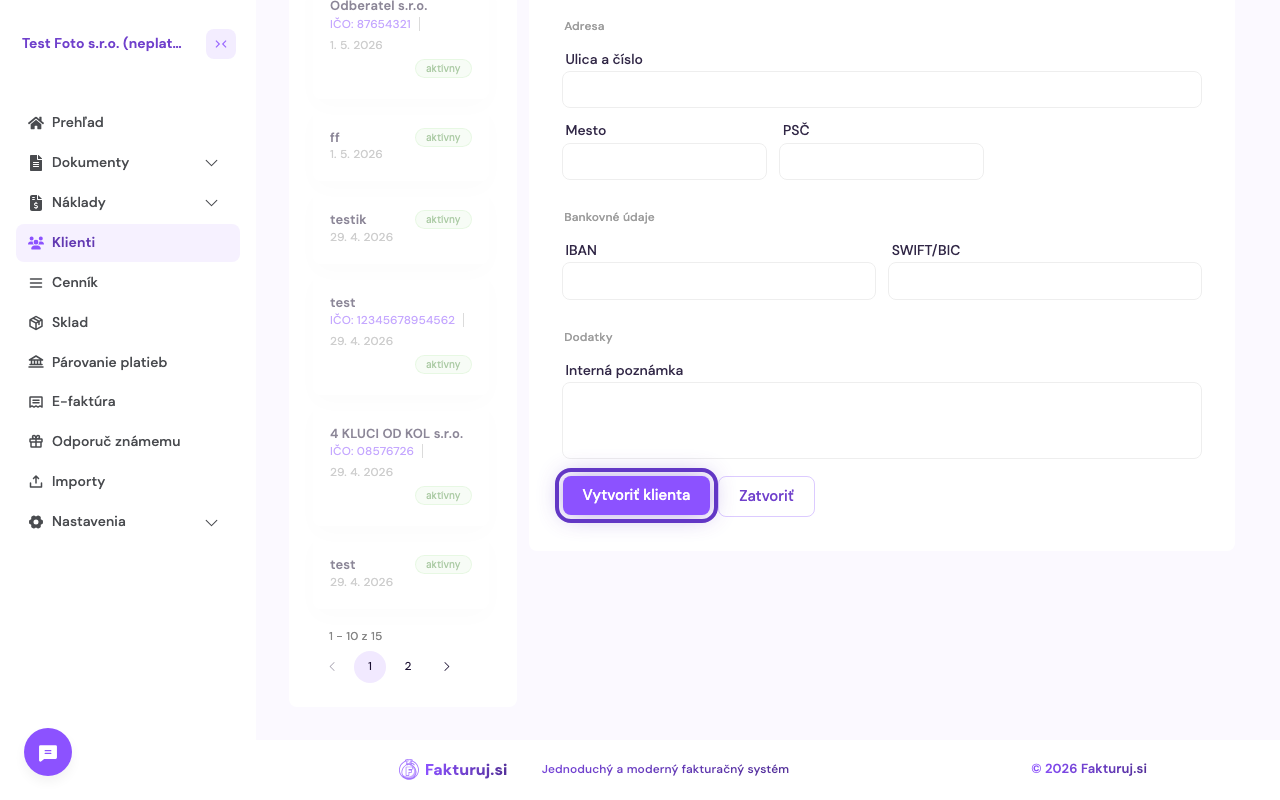
    Aktívne tlačidlo Vytvoriť klienta

    Frequently asked questions

    How do I edit an existing client?

    In the client list, click on the client and you’ll see an Edit button in the details. All changes take effect immediately — but the details won’t be updated on invoices that have already been issued.

    Can I assign a client to multiple entities?

    Yes. In the “Available to entities” field, select all the entities to which you want to make the client available. If you invoice under multiple companies, the client will be available to each of them.

    How do I delete a client?

    Open the client’s details and click on Delete in the menu. Please note — if the client has outstanding invoices, we recommend deactivating them (setting their status to inactive) rather than deleting them, so that the history is preserved.

    Can the client see my internal notes?

    No. The Note field is for your eyes only — it does not appear on the issued invoice.

    Previous Price list of services vs. Warehouse - when to use what Next How to record costs (expenses)

    Ready to issue your first invoice?

    30 days free, no commitment, no credit card.

    Try Fakturuj.si
    Fakturuj.si Logo Fakturuj.si

    Simple and affordable invoicing for freelancers and small businesses. For only 2€ per month.

    Navigation
    • Features
    • Price list
    • Integrations
    • FAQ
    • E-invoice
    • Tutorials
    • About us
    • Support
    • Legal Documents
    Industries
    • All sectors
    • Self-employed persons
    • Small companies
    • IT Services
    • E-shops
    • Craftsmen
    • Invoice Templates
    • Tax calculators
    • Accountants
    • Blog
    User
    • Login
    • Register
    • Forgotten password
    • How to get started
    Ing. Mariana Považanová
    Ing. Mariana Považanová Customer support
    info@fakturuj.si +421 902 059 753
    Advanced data encryption and anonymisation GDPR compliant Regular backups

    © 2026 Fakturuj.si. All rights reserved.

    Fakturuj.si

    A simple and modern invoicing system for €2 per month. No commitment, with full support.

    Product
    • Features
    • Price list
    • FAQ
    Industries
    • All sectors
    • Self-employed persons
    • Small companies
    • Craftsmen
    Calculators
    • All calculators
    • 🇸🇰 Slovakia
    • 🇨🇿 Czech Republic
    • 🇭🇺 Hungary
    Company
    • About us
    • Support

    © 2026 Fakturuj.si. All rights reserved.

    Global cloud service

    🍪

    Your experience matters to us

    Cookies help us continuously improve our services and tailor content to your needs. Thanks to them, we can offer you a better and faster invoicing tool.

    Cookie Settings

    Choose which types of cookies you want to allow. Some cookies are essential for the functioning of the site and cannot be disabled.

    Necessary cookies

    These cookies are necessary for the basic functioning of the site and cannot be disabled.

    Analytical cookies

    They help us understand how visitors use our site so we can continuously improve it.

    Marketing cookies

    They allow us to display relevant content tailored to your interests.

    Personalization cookies

    They allow you to customise content and features according to your preferences for a better experience.

    More information about cookies